

NEW IT Guides
We've been busy all summer long getting creating IT Guides along with our partners in Undergraduate Affairs, CELT, & Student Services.
Undergraduate Academic Planning IT Guide: Attention students: Follow this guide through each step of your academic journey. Connect to different tools and services for support on your path to graduation.
Instructors/TA IT Guide Follow this guide to learn about services we provide that support teaching on campus.


IT News, Updates and Links for a Successful Fall 2024

Symantec Antivirus will sunset October 1st
Symantec Antivirus Software will be sunsetting on October 1, 2024 and is no longer available for download from Softweb.
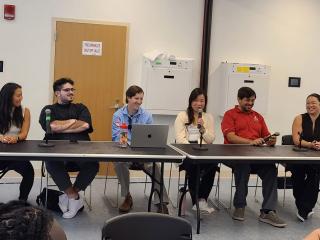
Mentorship Matters: Alumni Support for DoIT Student Employees
As part of DoIT’s 32nd annual Bootcamp — an annual retreat for student employees to connect with one another and with staff — five alumni served on a panel to discuss their journeys from DoIT undergraduate student employees to full-time professionals.
Upcoming Changes in Brightspace for the Fall 2024 Semester
For Fall 2024, Brightspace will have several new options/changes.
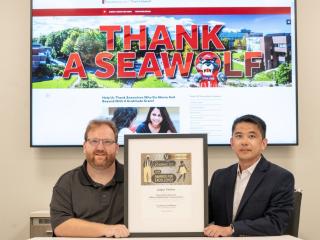
DoIT Teammates Win SUNYCUAD Award for Excellence
Richard Von Rauchhaupt, Senior Software Engineer and Web Platform Strategist and Architect as well as Raymond Chan, Director of Application Solutions on winning a 2024 State University of New York Council for University Advancement (SUNYCUAD) Award!
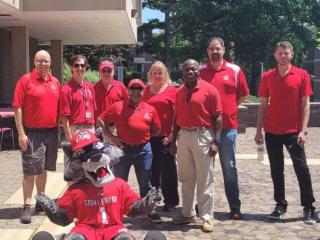
DoIT Toasts Success and Teamwork at Summer Celebration
DoIT department kicks back and celebrates a year of achievements at department BBQ on Tuesday, July 16th. Despite the heat, laughter filled the air, and staff and student workers enjoyed a well-deserved break to connect and unwind.

Rachael Redhead awarded SUNY’s Chancellor’s Award for Excellence in Professional Service
Stony Brook University Director of People & Culture, Rachael Redhead, has been awarded the State University of New York (SUNY) Chancellor's Award for Excellence in Professional Service.

Welcome Back Seawolves - IT tips for Fall '24
If you are new to our campus this Fall please know that DoIT is here to help you get off to a great start. Our Student IT guide is an excellent resource to learn more about the the services.

Moving Beyond Static Reports
The Enterprise Project Management Office (PMO) is excited to announce the launch of our brand new, dynamic Enterprise Project Management Dashboard.
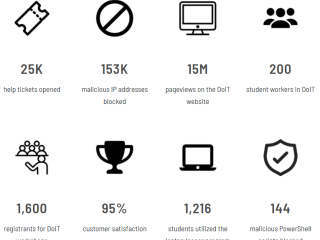
This Year in DoIT, by the Numbers
As another academic year draws to a close, DoIT wanted to take a moment to reflect on the achievements and support that the we have provided our vibrant campus community.
Hitting Our Stride: Innovate to Elevate
The road to digital equity in research and academia isn't without its bumps. Unequal access to technology and inadequate digital literacy remain formidable hurdles.
Recognizing this, DoIT aims to deliver on its mission by progressing on three major initiatives: Enabling Innovation & Transformation, Fostering Inclusivity & Professional Growth and Partnering to Modernize & Protect.
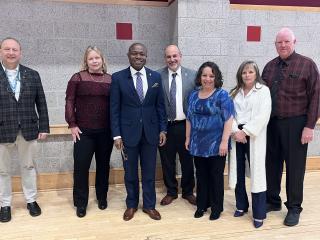
DoIT Hosts IT Town Hall Meeting
IT Leadership hosted IT Staff and partners from East and West Campus to discuss how we can strengthen partnerships to continue to move SBU forward.
Campus Solutions Successful Migration to Oracle Cloud Infrastructure
We started this year with a successful migration of our on-premise PeopleSoft Student Information System to Oracle Cloud Infrastructure (OCI) during the first week of January. For reference, this successful migration greatly improves the University's ability to serve students by shifting the system from outdated and unsupported on-premise hardware to modern, supported, cloud-based scalable and redundant infrastructure.

New student space available in Javits, 2nd floor
The 2nd floor of Javits now has seating available for students. There are places for groups, individuals, and a privacy booth. Seating is available on a first-come/first-serve basis. All students are welcome!
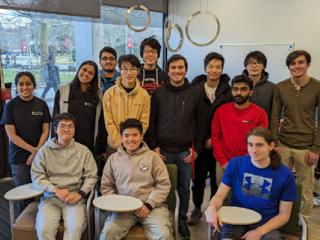
Student Technologists Promote Digital Literacy
Each semester, undergraduate students who work for Academic Technologies lead technology workshops to promote digital literacy. The purpose of our Digital Literacy program is to help our student leaders develop their leadership, communication, teamwork, and professional competencies while helping all students develop their technology skills.