

Touchless Printing with the Pharos Print App
Step-by-Step instructions to release a print job using the touchless printing feature from the Pharos Print App on your mobile device!
Before you begin, make sure you have the Pharos Print App currently installed on your mobile device.
- Once you have arrived at a Pharos Printer, open your Pharos Print App and select the print jobs you would like to release. Then tap the QR Code Scanner icon at the top right of the App.
(App may ask for permissions to use your camera, you must allow it.)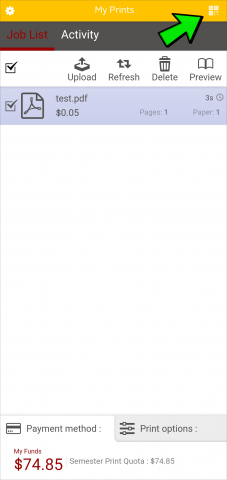
- Scan the QR Code image that is attached to the Pharos Card Reader. Then review the payment information popup and confirm if correct:

- Your print job(s) should start printing immediately.
Supported By
Customer Engagement and Support
Need Help? The fastest way to get support is by submitting a request through our ticketing system.
Get Help With Printing