

PointSolutions: Exporting Content From PointSolutions Classic
Question lists and PowerPoint presentations can be exported from PointSolutions. Exporting as a question list (.tpqx) content creates a copy of the file in the specified location. The file is not removed from its current location. Exporting as a rich text file (.rtf) creates an editable file of the question list. Only question lists can be export as .rtf.
Export as a Question List
Question lists and PowerPoint presentations can be exported using the Question List option.
- Open PointSolutions and sign in to your account.
- Select the Content tab.
- Click the Content drop-down menu and select Export.
- Choose Question List (.tpqx).
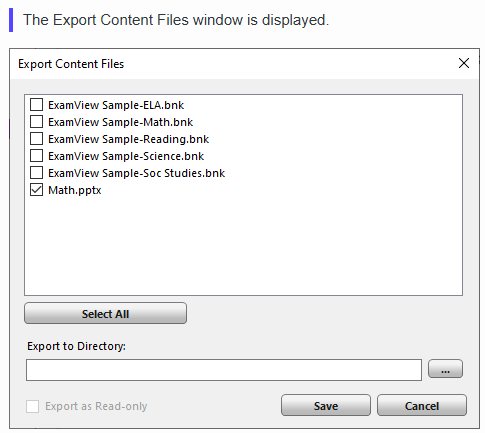
- Check the content to be exported, as shown in the figure above.

- To export all content from PointSolutions, click Select All.

- Click the 3 dots button and and navigate to the desired location.
- Click OK.
- Click Save.
Export as a Rich Text File
Question lists can be exported using the Rich Text File option.
- Open PointSolutions and sign in to your account.
- Select the Content tab.
- Choose a question list.
- Click the Content drop-down menu and select Export.
- Choose Rich Text Format (.rtf).
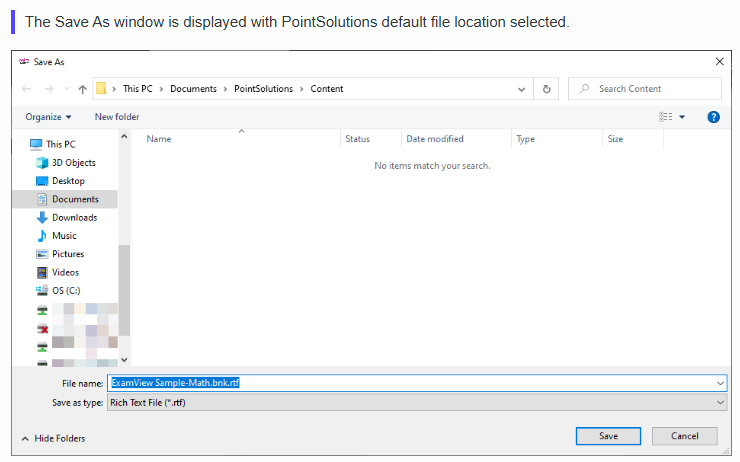
- Choose where to save the .rtf file if somewhere other than the default location.
- Enter a file name or leave the name as is.
- Click Save.
- Click OK.