

Getting a List of Student Email Addresses from SOLAR
Brightspace is the preferred system for sending email to students. In the event that Brightspace is not available AND you need to contact your students, you can download an Excel spreadsheet of your students that will contain a column of their Stony Brook email addresses.
Instructors may not provide email addresses to any external sources without permission from the Registrar's Office.
- Log into SOLAR with your EMPL ID# and your SOLAR password.
- Select Faculty Center in the Instructor Self Service Section
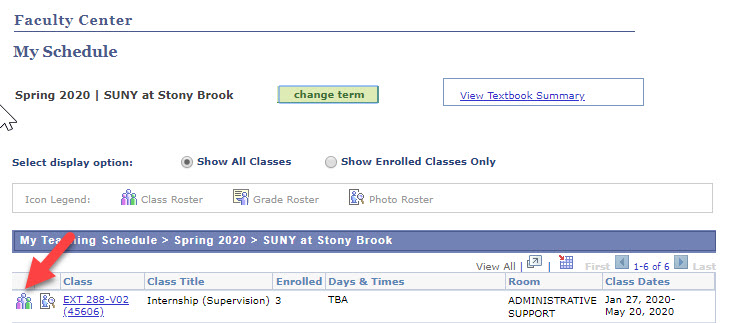
- Click the "people icon" next to the class that you want to email.
Your course roster will appear, you can then select the download class roster button
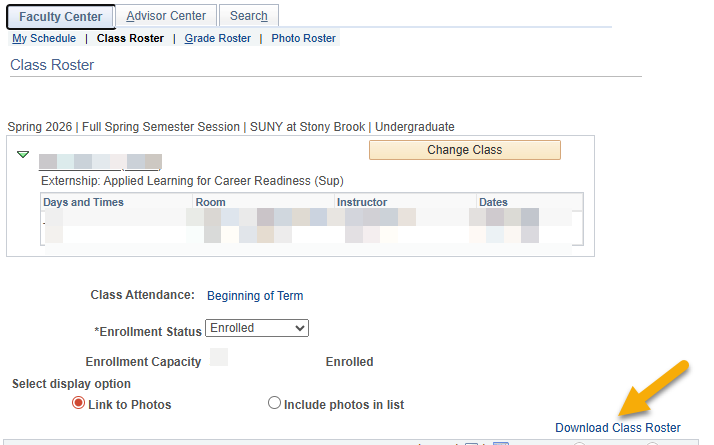
- An Excel file will download to your computer and should be available in your Download folder. We recommend you rename your course, including term, i.e.: Spring20_Ext288.xlsx so that you can find it later in a secure folder on your computer.
- Open the file and copy and paste the email addresses into the BCC field (email addresses are FERPA Protected) in your Google Mail (or Outlook)
- If you are using a shared computer, save to your Google Drive and remove the file from your Downloads folder. Make sure you empty the trash so that others cannot access the file.
For More Information Contact
Registrar's Office
(631) 632-6175 (Option 1)