

Preventing forwarded emails from Qualtrics' email triggers from going to recipients spam
Emails sent directly through Qualtrics are whitelisted and should not go to a Stony Brook users spam folder. However, when you forward these Qualtrics messages from your own inbox, they may go to spam.
How to Differentiate Qualtric Email Senders
- Messages sent from noreply@qualtrics-survey.com will not get spammed.
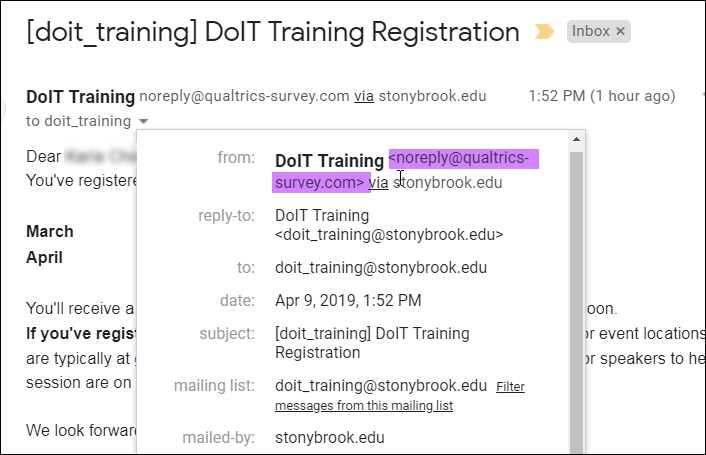
- E-mails forwarded directly from your e-mail inbox will likely be marked as spam.
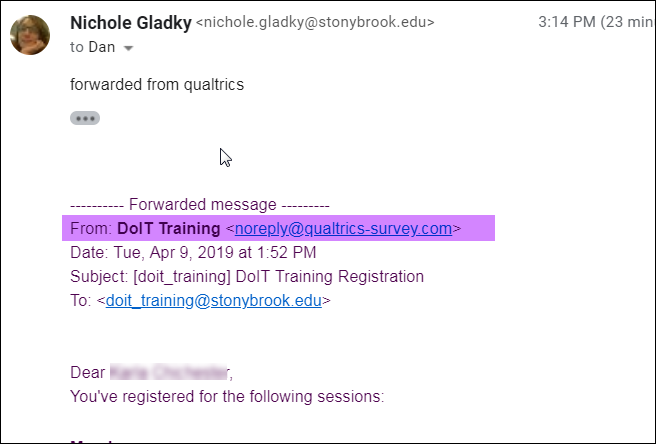
Editing the Email to Improve Deliverability
Removing the From: section of the forwarded message, as highlighted in the above screenshot, before sending should allow the e-mail to be delivered properly. We believe that google is flagging these messages because the <noreply@qualtrics-survey.com> looks suspicious to their filters.
Extra Information:
Checking If Your Email is Marked as Spam
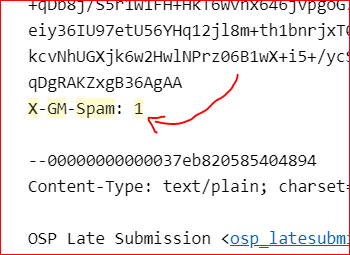
You can see if a message was marked as spam by the MTA (our mail transfer agent) by clicking on the 3 dots and then clicking Show original.
If it was marked as spam, it would have the tag X-GM-Spam: 1 right before the Content-Type.
Supported By
Customer Engagement and Support