

Viewing Federal Work Study Balance in SOLAR for Student Job Assignments
Student Employment Coordinators should check the Federal Work Study balance for their students every pay period!
The SA/FWS Clearance page shows the Federal Work Study award minus any salary that has actually been paid to the student to date. The View FWS Balance page provides more up to date information because it also includes the payroll pending from time sheets submitted.
- From the SOLAR home page, under Student Time Sheets, click View FWS Balance
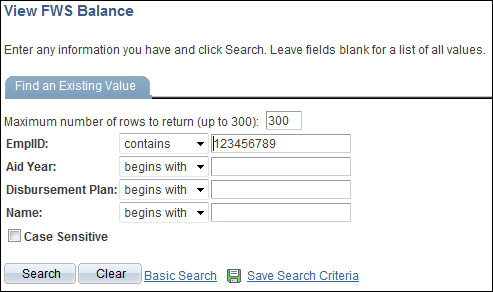
Enter the student’s Stony Brook ID in the EmplID field number and click Search:
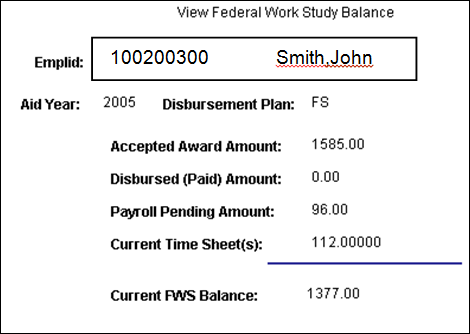
The current Federal Work Study Balance is calculated by subtracting the Disbursed Amount, Payroll Pending Amount, and Current Time Sheets from the Accepted Away Amount.
Click the Return to Search button to go back to the search page and enter another student’s EmplID. This is not a downloadable report but you can print the page by clicking the File menu and selecting Print. Or by pressing Ctrl + P on your keyboard.